
Opened 13 years ago
Closed 13 years ago
#26572 closed defect (bug) (invalid)
Twenty Eleven: strange fonts under IE9 and IE10
| Reported by: | BorisHristov | Owned by: | |
|---|---|---|---|
| Priority: | normal | Milestone: | |
| Component: | Bundled Theme | Version: | 3.2 |
| Severity: | normal | Keywords: | |
| Cc: | Focuses: |
Description
Hello team,
I am seeing a very strange problem with the design of my blog - www.borishristov.com
When I open it by using Chrome or Safari under Mac OS X - everything looks great.
When I open it by using Chrome, Firefox or even IE 11 - everything looks great.
However, when I open it with IE 9 or 10 - the font used for the whole blog seems to change in an ugly manner? -> https://pbs.twimg.com/media/BbPBJMcCQAEjqNY.png:large
Can you please take a look at this and suggest how I can fix it? I believe it's a theme problem, because even when we have deployed a brand new blog with that theme and opened it by IE 9 / 10 - the fonts are the same (not correct).
Thanks!
Attachments (2)
Change History (11)
#3
 @
13 years ago
- Summary TwentyEleven strange fonts under IE9 and IE10 → Twenty Eleven: strange fonts under IE9 and IE10
#5
 @
13 years ago
Take a look at the screenshot that I just attached. It is totally reproducible with a just deployed blog.
#6
 @
13 years ago
- Cc added
Tested with a clean install on Windows 8 and Internet Explorer 10 and could not reproduce.

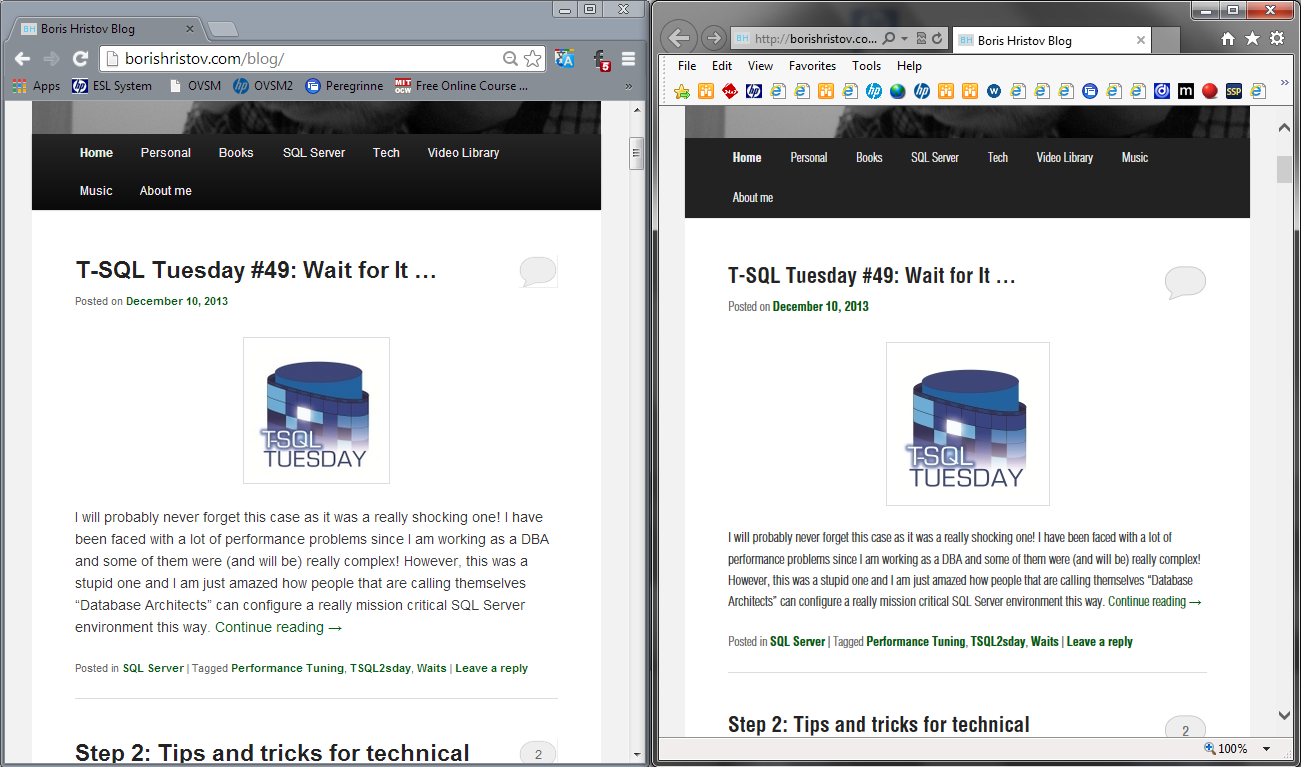


TwentyEleven displayed strangely in IE 9 and 10