
#62356 closed defect (bug) (wontfix)
Twenty Fifteen : On Adding background color to Navigation Block padding added in editor but not in frontend
| Reported by: | pitamdey | Owned by: | |
|---|---|---|---|
| Priority: | normal | Milestone: | |
| Component: | Bundled Theme | Version: | 6.1 |
| Severity: | normal | Keywords: | has-screenshots has-test-info close |
| Cc: | Focuses: |
Description
In Twenty Fifteen Theme,
When we add background color to navigation block we can see a padding added in the editor side but not in the frontend side
Can we just make the two side similar
I have added a screenshot for better understanding
Attachments (3)
Change History (15)
#1
 @
2 years ago
@pitamdey You have to add navigation to the group block and give it padding so that the padding in the editor and front view are the same.
#2
 @
2 years ago
Hi @tusharaddweb ...In other themes, it works well without adding the group block and custom padding. So I think it should work here also.
Let me know what your view on this
Thank you

This ticket was mentioned in Slack in #core-test by oglekler. View the logs.
2 years ago
#4
 @
2 years ago
Reproduction Report
Description
In the Twenty Fifteen theme, when a background color is added to the navigation block, padding appears in the editor view but is not visible on the frontend, causing the editor and frontend to display inconsistently.
Environment
- WordPress: 6.7
- PHP: 8.1.29
- Server: nginx/1.16.0
- Database: mysqli (Server: 8.0.16 / Client: mysqlnd 8.1.29)
- Browser: Chrome 130.0.6723.58
- OS: macOS
- Theme: Twenty Fifteen 3.9
- MU Plugins: None activated
- Plugins: Test Reports 1.2.0
Actual Results
- Padding appears in the editor but is missing on the frontend.
#5
@
2 years ago
Test Report
Description
This report verifies that the indicated patch resolves the issue by correcting the inconsistency in padding between the editor and frontend views for the navigation block in the Twenty Fifteen theme.
Patch tested: https://core.trac.wordpress.org/attachment/ticket/62356/62356.patch
Environment
- WordPress: 6.7
- PHP: 8.1.29
- Server: nginx/1.16.0
- Database: mysqli (Server: 8.0.16 / Client: mysqlnd 8.1.29)
- Browser: Chrome 130.0.6723.58
- OS: macOS
- Theme: Twenty Fifteen 3.9
- MU Plugins: None activated
- Plugins: Test Reports 1.2.0
Actual Results
- ✅ After applying the patch, the padding for the navigation block appears consistently on both the editor and frontend, confirming that the issue is resolved.
#6
 @
2 years ago
- Keywords has-testing-info added
Reproduction Report
Description
This report validates whether the issue can be reproduced.
Environment
- WordPress: 6.8-alpha-59274-src
- PHP: 8.2.25
- Server: nginx/1.27.2
- Database: mysqli (Server: 8.0.40 / Client: mysqlnd 8.2.25)
- Browser: Chrome 129.0.0.0
- OS: macOS
- Theme: Twenty Fifteen 3.9
- MU Plugins: None activated
- Plugins:
- Test Reports 1.2.0
Actual Results
- ✅ Error condition occurs (reproduced).
Supplemental Artifacts
Editor: 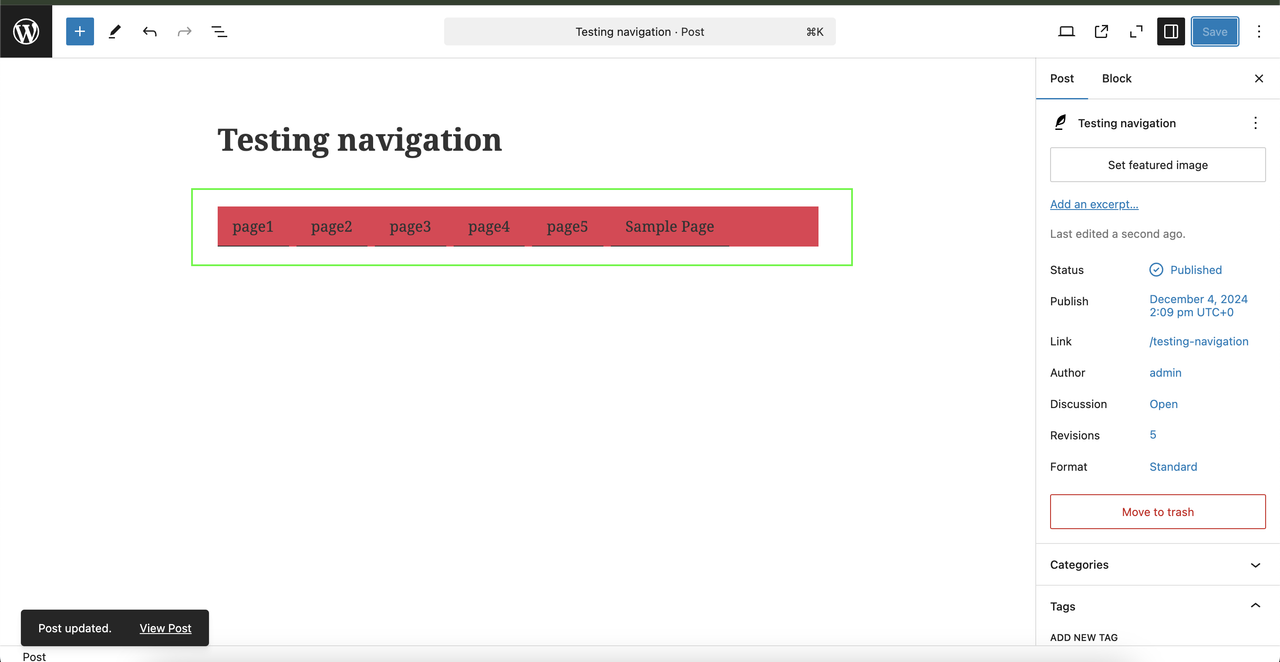
Frontend: 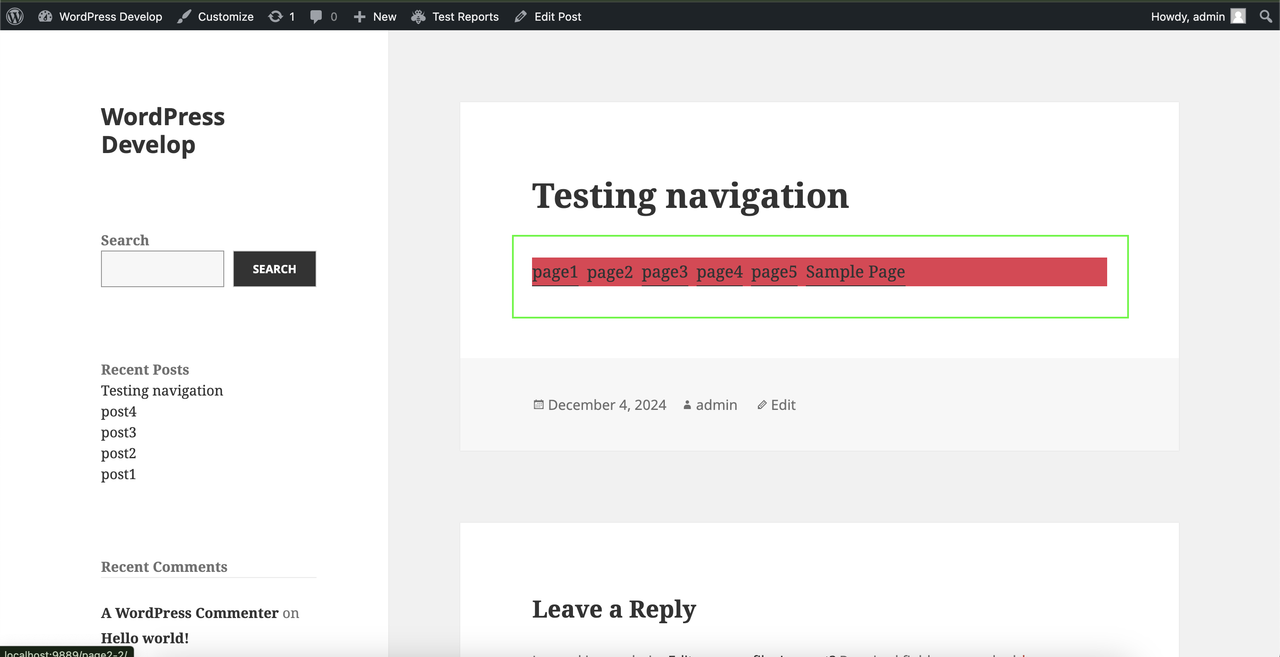
#7
@
2 years ago
Test Report
Description
This report validates whether the indicated patch works as expected.
Patch tested: https://core.trac.wordpress.org/attachment/ticket/62356/62356.patch
Environment
- WordPress: 6.8-alpha-59274-src
- PHP: 8.2.25
- Server: nginx/1.27.2
- Database: mysqli (Server: 8.0.40 / Client: mysqlnd 8.2.25)
- Browser: Chrome 129.0.0.0
- OS: macOS
- Theme: Twenty Fifteen 3.9
- MU Plugins: None activated
- Plugins:
- Test Reports 1.2.0
Actual Results
- ✅ Issue resolved with patch.
Supplemental Artifacts
Frontend: 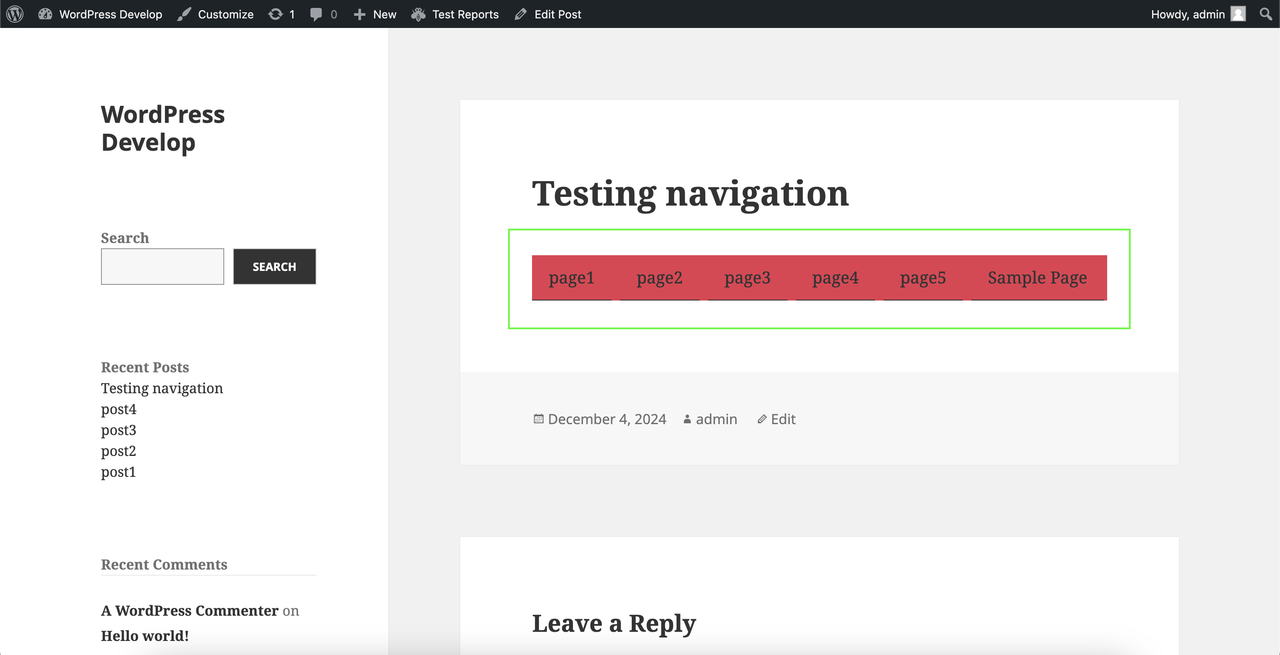
#9
 @
3 months ago
Test Report
Summary
Test Environment
- WordPress: 6.8-alpha-59274-src
- PHP: 8.2.25
- Server: nginx/1.27.2
- Database: MySQL 8.0.40
- Browser: Chrome 129.0.0.0
- Operating System: Windows 11
- Theme: Twenty Fifteen
- MU Plugins: None
- Active Plugins:
- Test Reports 1.2.0
Testing Results
- Applied the patch.
- Verified the affected functionality.
- Confirmed that the reported issue is no longer reproducible after applying the patch.
- No unexpected behavior or regressions were observed during testing.
Outcome
✅ Tested successfully. The patch fixes the reported issue and performs as expected.
#10
 @
3 weeks ago
- Keywords close added
I understand what this is doing but to me, I am reluctant to change padding on a theme that has been out a while and has had child themes potentially doing similar things. We have to think of the implications of fixing downstream. I do appreciate the work people have done, this isn't a judgement against that.
I would therefore, propose this doesn't get resolved in the theme and for now as there is a workaround, which people are most likely using, that is the path forward.
#11
@
3 weeks ago
- Milestone Awaiting Review
- Resolution → wontfix
- Status new → closed
As per my suggestion above I am now going to go through and close this. I do appreciate everyone's contribution so far. It's worth noting that closing is a state, not a dead-end. We can always reconsider based on feedback and input. Thank you again.
#12
 @
3 weeks ago
- Version → 6.1
I agree about closing the ticket.
- The block's default padding, shown in the editor, seems too thick to me with the bottom border and with the dropdown chevron icons.
- I prefer the workaround of adding custom padding on a Group block so it is around all items but not each individual link.
The Navigation block was not available until WordPress 5.9, and Twenty Fifteen only allows it within a post. WordPress 6.1 reduced the specificity of the block selector to zero (GB42967), less than Twenty Fifteen has for a elements in its CSS reset on the front end.
I considered adding a smaller amount of padding in both stylesheets, but leaving the ticket closed is probably better than trying that approach.
using rem in blocks.css
:where(.wp-block-navigation.has-background .wp-block-navigation-item) a:not(.wp-element-button) {
	padding: 0.5rem;
}
using px in editor-blocks.css
:where(.wp-block-navigation.has-background .wp-block-navigation-item) a:not(.wp-element-button) {
	padding: 5px;
}


Editor View