#17210 closed defect (bug) (fixed)
Massive duplication of oEmbed postmeta
| Reported by: |
|
Owned by: |
|
|---|---|---|---|
| Milestone: | 4.0 | Priority: | normal |
| Severity: | normal | Version: | 3.1 |
| Component: | Embeds | Keywords: | reporter-feedback |
| Focuses: | Cc: |
Description
Hey guys,
Ever since my blog grew to a considerable size (a few million PVs a month) and started slowing down and exploding my server, I've been looking and implementing various optimizations. During one such passes through the data, I noticed this really weird oEmbed related behavior, which I've been observing for a number of WP version upgrades.
I use [embed] shortcodes a lot, and every new post after a few minutes ends up with a ton of oembed caches that don't belong to it at all - they're all from other posts. Posts that don't even have [embed]s at all still have over 100 oembed entries in wp_postmeta.
Here's an example of just a small subset of data residing in the table:
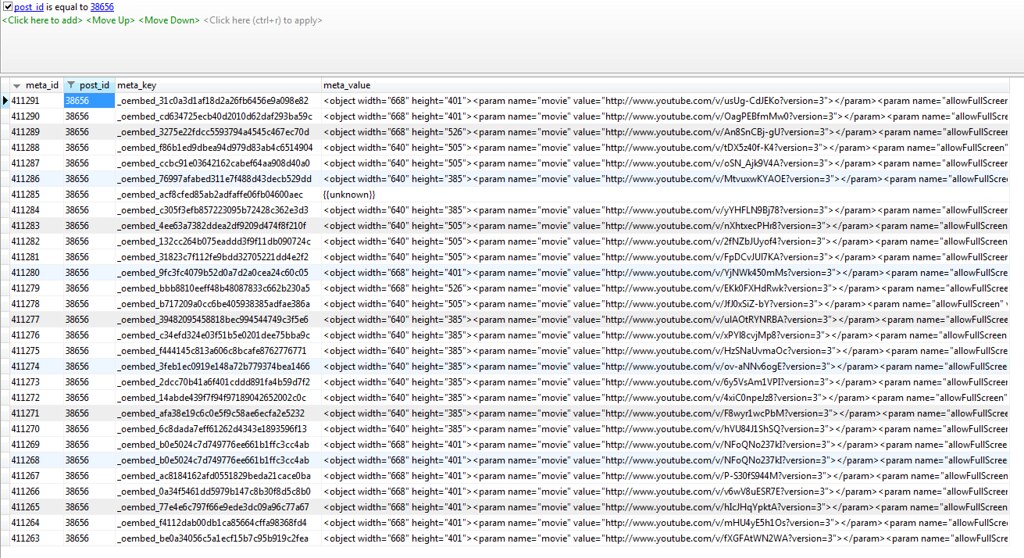
There are now about 150,000 entries in the wp_postmeta table due to this, half of which are duplicated _oembed entries, which I think has heavy impact on server load. Not only that but I'm sure WP is filling the table up with values by redoing oEmbed queries, which may explain that load shoots up very high at times when publishing.
mysql> select count(*) from wp_postmeta where meta_key like '_oembed%';
+----------+
| count(*) |
+----------+
|    81499 |
+----------+
1 row in set

mysql> select count(*) from wp_postmeta;
+----------+
| count(*) |
+----------+
|   148451 |
+----------+
1 row in set
Just look at how many times this random video embed value shows up in the table. I'm sure it was used in only one actual post:
mysql> select count(*) from wp_postmeta where meta_value like '%p2oWELcd-lI%';
+----------+
| count(*) |
+----------+
|      815 |
+----------+
1 row in set
Just to clarify - I don't have 815 updates to a single post that may have explained this - these are completely unrelated, separate, published posts.
To put things in perspective, here are the top 20 offenders:
mysql> select distinct meta_key, count(*) as cnt from wp_postmeta where meta_key like '_oembed%' group by meta_key order by cnt desc limit 20;
+------------------------------------------+-----+
| meta_key                                 | cnt |
+------------------------------------------+-----+
| _oembed_5607e41abb700707540a854ae76182cf | 864 |
| _oembed_984bc07d3bc0f61b6b35230cd2fa7ced | 859 |
| _oembed_da8ae36275b4576cfcd92c0ed455be96 | 859 |
| _oembed_71dd4068a9a6911f50dbe57b3ff477c5 | 858 |
| _oembed_9f817e820c23ccbfac9b22b3474e5dd3 | 858 |
| _oembed_f3c1c03a81bc301b5f1a063f65119328 | 857 |
| _oembed_31bf10d95cb7c8e9f646d9d6e5728da0 | 857 |
| _oembed_25d0ebf59c994050cb604900cf04f53f | 856 |
| _oembed_6265dae657e38579c0a8ddb66132d526 | 852 |
| _oembed_562dd8c13888905cbd15dbd74e8699cc | 849 |
| _oembed_30ea17d1cc73acd925a74373d2be32ec | 848 |
| _oembed_87f16916b4da6571f454266bfbfaebe0 | 847 |
| _oembed_9f1f038d43e973bd60929201eee24f57 | 843 |
| _oembed_d46317d44fe11c0d90ef2cc3b45bce57 | 843 |
| _oembed_b1f8685ba405feee46baf9408eb632f7 | 841 |
| _oembed_1b56f492eba4c4ea698d816d0ecf2d51 | 840 |
| _oembed_fe597714de4081e6e7e78a88256c7db4 | 840 |
| _oembed_fb843e7b604cbc4e1ffa144d4eb300c8 | 839 |
| _oembed_97b12f2f1e59ee6eff95c61095aa5bef | 838 |
| _oembed_2b94d9f7c28ee37bfbead0a622c8be85 | 838 |
+------------------------------------------+-----+
20 rows in set
I'm quite at a loss here and would appreciate the next debugging steps. I haven't been able to determine where things are going wrong on my own.
Thank you.
P.S. The site in question is AndroidPolice.com
Change History (38)
#2
 @
@
14 years ago
- Keywords reporter-feedback added
- Owner set to Viper007Bond
- Status changed from new to accepted
#3
follow-up:
↓ 5
 @
@
14 years ago
- Cc Denis-de-Bernardy added
@Viper: even if he is using query_posts() before the posts are displayed or something along those lines (which I suspect is likely, since many themes offer a widgets area before the loop kicks in), shouldn't WP be smart enough to consult $wp_the_query rather than $wp_query when caching these things?
#4
follow-up:
↓ 6
 @
@
14 years ago
- Keywords reporter-feedback removed
Yup, I've done exactly this query one time before after backing up the table, and, as you can imagine, the issue persisted. In fact, they all got repopulated with the same duplicates pretty fast.
I will try to reproduce with the default theme and start disabling plugins. Should I be looking for query_posts() specifically as a possible culprit or can you suggest a few more?
I must say, if this is indeed the problem, there should probably be a catch for preventing this from happening in the core. I.e. it's a possible bug.
Thanks for the quick response.
#5
in reply to:
↑ 3
@
14 years ago
Replying to Denis-de-Bernardy:
@Viper: even if he is using query_posts() before the posts are displayed or something along those lines (which I suspect is likely, since many themes offer a widgets area before the loop kicks in), shouldn't WP be smart enough to consult $wp_the_query rather than $wp_query when caching these things?
How would it know where in that array it is?
It globals $post and then uses $post->ID. The code is here:
https://core.trac.wordpress.org/browser/trunk/wp-includes/media.php#L1150
#6
in reply to:
↑ 4
@
14 years ago
Replying to archon810:
I will try to reproduce with the default theme and start disabling plugins. Should I be looking for query_posts() specifically as a possible culprit or can you suggest a few more?
I'm realizing how that probably wouldn't cause this because as soon as the_post() is called in your loop, the $post variable is re-set to the correct value.
I must say, if this is indeed the problem, there should probably be a catch for preventing this from happening in the core. I.e. it's a possible bug.
That's not really possible as far as I can think. WordPress is just dealing with the data you give it and it can't tell that the data you're giving is wrong.
#8
@
14 years ago
Any chance of you privately sharing your theme's source with me so that I could attempt to reproduce? It could be a million things.
You can e-mail it to me at whatever@[myusername].com
#9
@
14 years ago
Just to update you guys on this ticket, Alex's recommendation before sending him the theme was to figure out if it's a plugin doing it or not. So, I cloned the setup, deleted all the oembed keys and tried to repro the issue, but so far was not able to. Because production gets so much more traffic hitting it in every which way possible, it could be a concurrency issue that is not present when I'm testing or something that is hitting it in a specific way.
One thing I did notice - if I delete the oembed keys for a specific post on production, then they don't get repopulated until I update or publish something. It doesn't happen instantly either - it seems to coincide with /wp-cron.php?doing_wp_cron showing up in the running thread list, although I can't be 100% sure they're related. Something to think about.
#10
@
14 years ago
After doing more extensive research and stracing Apache threads, I believe I've finally root caused this bug.
It seems like all the duplicate oembed entries are created due to #17560 that I opened earlier today. (Please read it first, then proceed).
I've reset to_ping on all posts that had it set to
(comma
separated)
which was about 850 out of almost 3000 posts, and none of the subsequent new posts contain duplicate oembed keys anymore.
I then cleared all oembed keys from the db (128k entries) and monitored the situation for an hour. No duplicates were created.
Then, to verify the theory, I went back to the backups of the postmeta and posts tables and cross referenced the embeds that are created over and over with the posts they appear in. In such comparison, as I suspected, most (95%) posts containing those embeds had that corrupt to_ping column.
Now, it's beyond my knowledge scope why exactly what is happening here is happening, but my guess is somewhere in wp-cron, paths get crossed, and duplicate oembed entries are created all over the place.
Please validate my assumptions - I know I'm onto something here. It's a great feeling to kill 2 birds with 1 stone.
#11
follow-up:
↓ 12
@
14 years ago
I've confirmed that fixing #17560 solves both this bug and my massive load after each post is published problem that's been getting worse and worse over the past months and made me lose a lot of sleep. Wordpress makes sense again!
#12
in reply to:
↑ 11
 @
@
14 years ago
- Milestone Awaiting Review deleted
- Resolution set to worksforme
- Status changed from accepted to closed
#13
@
14 years ago
- Resolution worksforme deleted
- Status changed from closed to reopened
I'd like to re-open this bug. I have a script that cleans out bad values from #17560 every day, which helps, but the problem still exists in WP 3.2, and it's pretty bad. My server keeps getting annihilated after new posts, and I suspect it has something to do with these oembeds.
For example, I just published a fresh post with a number of oembed tags. The load shot up to 50 and apache was maxing out big time. After it finally calmed down a few minutes later, I went to check and found this:
select distinct meta_key, count(*) as cnt from wp_postmeta where meta_key like '_oembed%' group by meta_key order by cnt desc limit 20;
+------------------------------------------+-----+
| meta_key                                 | cnt |
+------------------------------------------+-----+
| _oembed_0c83472a9e841c9ad60a38893f808eb6 | 176 |
| _oembed_5acdb1907d1540ae412c8a8212f34826 | 176 |
| _oembed_b8bf13bcc3898fd1a6d97946034aacfb | 176 |
| _oembed_4d092cafea6ebaf8822f7c0598e1e527 | 175 |
| _oembed_bd80b0ae6473d6273358e38813c91f21 | 175 |
| _oembed_ccc6cfc349b836eed7ad88defad3812d | 175 |
| _oembed_8a8284e37c86e4e1cc9bf9f4534a9230 | 175 |
| _oembed_86c07331b01f79c929c56275e4a51696 | 175 |
| _oembed_5f227997ee21e52a717dce2e815726f7 |  83 |
| _oembed_4aa03f10ff8a01acdcea73fa8e934be9 |  81 |
| _oembed_a9334d906665e64c06de2f811770dec3 |  80 |
| _oembed_36b3fa71c7d97154385e622f6cb19945 |  76 |
| _oembed_1ac243689d6da991beac8048902ae7aa |  73 |
| _oembed_6e30160985bec33c2662edda70af41e2 |  71 |
| _oembed_3422a41efb21a00716c6ac559afa43d4 |  64 |
| _oembed_089232cc03ea36671c318afa1fe651c3 |  64 |
| _oembed_ca71e42982bcf5bd136b25db37826695 |  63 |
| _oembed_1673cbc900c2e6bb47469db2ff85a19b |  58 |
| _oembed_c72a480c4f00f9e84e9ba59a346fd371 |  56 |
| _oembed_0b9f5ab1f1e433dca163541ada9bf955 |  50 |
+------------------------------------------+-----+
Checking one of those oembeds with 176 duplicates, I found that all 176 are attached to the same post id, the one I just published. This points towards some sort of a concurrency issue - as if all PHP threads suddenly see a new oembed tag that hasn't been resolved yet and all try to do it at the same time. I'm not sure what the mechanism for that is, perhaps it's related to wp-cron concurrency issues, but perhaps not.
It's also worth pointing out that I have apache configured with 170 max children, which is suspiciously close to 176.
P.S. I've switched from WP Super Cache to W3 Total Cache (latest public version 0.9.2.4) to utilize memcached support, in case this ends up being important. I'm using page cache, object cache, and db cache, all pulling from memcached.
#14
@
14 years ago
Fascinating, I updated the post, and the number of oembed tags for the case I was looking at "_oembed_b8bf13bcc3898fd1a6d97946034aacfb" went down to 0, then started crawling back up and stopped at 24.
I updated again, and it went to 0 again, then went up to 1, and it's now just 1.
#16
follow-up:
↓ 17
 @
@
14 years ago
This is really weird. Calling update_post_meta() should mean only one meta key per object ID.
Do you have JS disabled, perhaps?
Random thing I see: Limiting oembed caches to certain post types (embed_cache_oembed_types) seems weird.
#17
in reply to:
↑ 16
@
14 years ago
Replying to nacin:
This is really weird. Calling update_post_meta() should mean only one meta key per object ID.
Do you have JS disabled, perhaps?
Random thing I see: Limiting oembed caches to certain post types (embed_cache_oembed_types) seems weird.
I'm guessing that's the idea, but maybe concurrency bugs with multiple PHP threads are kicking in and messing things up.
As for JS, do I have JavaScript disabled? I'm not following what that has to do with the server-side? Or did you mean something else? The site has about 150k daily pageviews, so what my browser settings are shouldn't really matter.
#18
follow-up:
↓ 19
 @
@
14 years ago
Looking at the WP_Embed code, it seems possible to have duplicate meta keys due to concurrency.
- On line http://core.trac.wordpress.org/browser/trunk/wp-includes/media.php#L1046, all the oembed meta_keys are deleted after saving the post.
- Then, on line http://core.trac.wordpress.org/browser/trunk/wp-includes/media.php#L1049, the oembed cache is filled via an ajax call if one updates the post (or publishes it). However, at this point the post was already inserted in the DB and if it's publicly accessible (i.e. not private), it will show up in the front page. Thus, there may be duplicated keys if update_post_meta is executed concurrently.
One thing to try would be to update the oembed cache before the post becomes available on the front page.
Not sure if the that makes sense or if it probably means that I have to sleep :)
#19
in reply to:
↑ 18
@
14 years ago
Replying to xknown:
Looking at the WP_Embed code, it seems possible to have duplicate meta keys due to concurrency.
- On line http://core.trac.wordpress.org/browser/trunk/wp-includes/media.php#L1046, all the oembed meta_keys are deleted after saving the post.
- Then, on line http://core.trac.wordpress.org/browser/trunk/wp-includes/media.php#L1049, the oembed cache is filled via an ajax call if one updates the post (or publishes it). However, at this point the post was already inserted in the DB and if it's publicly accessible (i.e. not private), it will show up in the front page. Thus, there may be duplicated keys if update_post_meta is executed concurrently.
One thing to try would be to update the oembed cache before the post becomes available on the front page.
Not sure if the that makes sense or if it probably means that I have to sleep :)
Makes perfect sense — that's actually why I asked if the author had JS disabled, because that would mean the cache wouldn't even be populated at all. Definitely possible for there to be a race condition here.
That said, update/add_metadata() are fairly careful. Pretty crazy traffic to cause that kind of flood. Curious if this has been seen on WP.com or if the code runs differently there.
#20
@
14 years ago
Nacin, yeah, but I'm still not sure what 1 person's JS has to do with this issue where traffic is generated by 300-700 people on the site at any given time.
I think there are still other issues exacerbating the situation and making it worse (the issue is a LOT worse on W3TC compared to WP Super Cache, for example), but those issues are helping surface the true problem with oEmbeds.
#21
@
13 years ago
Hi guys,
I'd like to get this bug resolved. Could someone take another look please?
#22
 @
@
13 years ago
- Keywords has-patch added
(I may be completely wrong but....)
Shouldn't this be in the options table and just not autoload? If I post the same YouTube video on 19 posts, I should just have one cache entry. Seems like _oembed_* as an option or transient would solve this? It seems like deleting from the cache is less important than not duplicating.
Attached example patch.
#26
follow-up:
↓ 30
 @
@
13 years ago
I'd like to get rid of the big non-autoload values that end up in options, not add more.
As things get pushed out of the cache we could see lots of oembed refetch activity on a busy site.
#27
follow-up:
↓ 28
 @
@
13 years ago
- Cc alanpae added
Hi there,
I was looking for something like this thread.
I have over 270,000 _oembed_* entries in post_meta and only about 33K blog entries. Is it ok to just delete all of these or will it have severe consequences. Looking this ticket over it seems to be ok but would just like to make sure.
Thanks,
alan
#28
in reply to:
↑ 27
@
13 years ago
Replying to alanpae:
Hi there,
I was looking for something like this thread.
I have over 270,000 _oembed_* entries in post_meta and only about 33K blog entries. Is it ok to just delete all of these or will it have severe consequences. Looking this ticket over it seems to be ok but would just like to make sure.
Thanks,
alan
It's OK, WP will just re-generate the oEmbed tags on the fly. The only thing is if some videos were taken down, instead of the embed tag (which wouldn't play anything anyway), you'd get plain links instead. Not really a big deal.
Out of curiosity, what site are you talking about with 33k posts?
#30
in reply to:
↑ 26
 @
@
13 years ago
- Keywords punt removed
- Milestone changed from 3.5 to Future Release
Replying to ryan:
I'd like to get rid of the big non-autoload values that end up in options, not add more.
As things get pushed out of the cache we could see lots of oembed refetch activity on a busy site.
I said approximately the same thing to wonderboymusic myself, just not as well :) Pointed out that, for example, Twitter has a relatively low rate limit based on IP, which already quickly runs out on a shared host and for a user who embeds a bunch of tweets in one post and either leaves the editor open or saves small changes a bunch of times (anything that triggers save_post). Triggering even more of those requests on the front all at once because of expiration would not end well.
Would love to see a better solution, but don't think an expiring transient is it. Also a bit late for 3.5.
#32
 @
@
12 years ago
Seems like the latter part of this discussion (about the storage location) would be better suited for #14759. The original problem with this ticket is why the duplication is happening in the first place.
#33
@
11 years ago
- Keywords dev-feedback removed
- Milestone changed from Future Release to 4.0
Let's decide what to do as part of our oEmbed sweep
#35
@
11 years ago
- Keywords reporter-feedback added; needs-patch removed
It doesn't seem like we ever really identified what was happening in your case, but I went ahead and mentioned this in [28972], as I believe the possibility of stampedes (a likely culprit) to be significantly reduced in many cases. The one where it might not is if you are using the text editor or caching oEmbeds from areas besides the post content, and posts are immediately published and viewed by many. markjaquith and I talked about implementing a lock during caching, but locks are not foolproof. Leaving open for now, would love if archon810 were able to report back. :)

This ticket was mentioned in IRC in #wordpress-dev by DrewAPicture. View the logs.
11 years ago
#37
@
11 years ago
- Resolution set to fixed
- Status changed from reopened to closed
Closing as fixed - archon810, if this is still happening, please do continue the discussion here and we will go from there.
#38
 @
@
9 years ago
I'm looking at my up to date 4.5.3 multisite retaining hundreds of rows of oembed cache post meta values, and am having trouble understanding from [28792] whether WP is supposed to clear ancient oembed cache values over time, or are these going to be building up infinitely. TTL seems to indicate it should, but how do I verify whether this is operating correctly - the hashed keys don't make it particularly easy?
Duplicates is expected -- it's not smart enough to cache cross-post (say if you embed the same video in multiple posts).
However it should only cache to the current post (i.e. the one with the video in it) and if it's not, then perhaps you are polluting the
$postglobal somewhere. Can you reproduce this using the default theme? Perhaps you are usingquery_posts()in your sidebar or something?By the way -- it's safe to delete all of those rows if you want to. The caches will be repopulated on the fly.