Opened 7 months ago
Last modified 7 months ago
#64044 reopened enhancement
Request to change the limit of each sitemap to 1000 urls instead of 2000 urls as current
| Reported by: |
|
Owned by: | |
|---|---|---|---|
| Milestone: | Awaiting Review | Priority: | normal |
| Severity: | normal | Version: | |
| Component: | Sitemaps | Keywords: | 2nd-opinion |
| Focuses: | Cc: |
Description
Google Search Console standard is always 1000 urls, so please request to change the default sitemap limit from 2000 to 1000 urls to match Google Search Console standard. Request to apply this standard on WordPress version 6.9
Attachments (4)
Change History (46)
#2
 @
@
7 months ago
@sajjad67 I mean change the default limit of each sitemap from 2000 to 1000. Here is an example, wordpress default sitemap always has 2000 urls https://jorbintesting.kinsta.cloud/wp-sitemap-posts-post-1.xml
#3
@
7 months ago
@sajjad67 The maximum number of URLs that can be displayed and exported by Google Search Console is only 1000. That's why I recommend setting the default from 2000 to 1000 to match Google Search Console standards.
#4
 @
@
7 months ago
@phanduynam, looking at the wp_sitemaps_get_max_urls function (https://developer.wordpress.org/reference/functions/wp_sitemaps_get_max_urls/), it would appear that you can increase this amount on a per-site basis by using the wp_sitemaps_max_urls filter.
https://developer.wordpress.org/reference/hooks/wp_sitemaps_max_urls/
#5
 @
@
7 months ago
@phanduynam in your case, here is a small snippet to change based on your requirements.
add_filter( 'wp_sitemaps_max_urls', function( $max_urls, $object_type ) {
    return 1000; // change here how much you want.
}, 10 , 2 );
#6
 @
@
7 months ago
- Focuses sustainability coding-standards removed
- Milestone Awaiting Review deleted
- Resolution changed from invalid to wontfix
We shouldn't make changes simply based off some tool's display or export limits
#7
@
7 months ago
@swissspidy Google has 90% of the search engine market share, double that of WordPress, which has only 43% of the website market share. I suggest you reopen this issue, without any in-depth discussion, it is unreasonable to close it unilaterally.
#9
@
7 months ago
@sajjad67 @psykro As the article stated, I need a default solution instead of custom code. Since most WordPres users don't know how to code
#11
@
7 months ago
@swissspidy Why did you set this number to 2000? It doesn't help the user at all. 1000 has its uses.
#13
 @
@
7 months ago
- Keywords reporter-feedback added
- Milestone set to Awaiting Review
- Severity changed from major to normal
- Version 6.8.2 deleted
@phanduynam
First, you can put all your comments in one single comment.
If you want to add more, you can edit your comment.
No need to write 37 comments every time you would like to comment on multiple things.
I can agree with you that 2000 is totally arbitrary. That day @swissspidy woke up with the 2 in the head.
But it's also true that 1000 is also arbitrary by GSC. There is no best number here.
How does affect you the fact that there are 2000 URLs instead of 1000 concerning GSC?
From my experience, GSC doesn't have trouble crawling 2000 URLs or whatever number of URLs you have.
#14
follow-up:
↓ 18
@
7 months ago
@SirLouen As I said above, the problem is not the Google Search Console crawl limit as it can be up to 50,000 URLs per sitemap. The problem is that when you download data from Google Search Console, you can only view and export 1,000 URLs per sitemap. If by default you have 10,000 URLs divided into 5 sitemaps, you can only export up to 5,000 URLs because WordPress has set the maximum sitemap limit to 2,000. To export all 10,000 URLs, you would have to set the limit for each sitemap to 1,000 URLs. This is a serious data shortage problem for those who need to process the data, the only solution is to change the code or install a plugin. Changing the code is confusing and can be dangerous, and installing a plugin makes the site heavier. Both of these methods are very labor intensive when someone owns a large number of websites.
#15
@
7 months ago
@SirLouen @swissspidy @sajjad67 @psykro In addition to Google Search Console, several other webmaster tools also limit views and data downloads to 1000. The current market share is at least 95%. With the current default WordPress, I know of two major SEO issues that affect sites with more than 2000 pages. The first issue is a bug in webmaster tools that prevents it from crawling the second branch of the sitemap, meaning those URLs may not show up in search engines. The second issue we are talking about is the lack of optimization for viewing and exporting sitemaps in webmaster tools.
#16
follow-up:
↓ 37
@
7 months ago
- Keywords reporter-feedback removed
- Milestone Awaiting Review deleted
- Resolution set to wontfix
- Status changed from reopened to closed
We shouldn't reduce the number of posts per sitemap page because of the shortcomings of some external tool's report or export functionality. And we can't update it anytime they would change that number. And if a search engine has issues crawling a website, they should not fix the crawler. It wouldn't be on WordPress to accommodate that.
Lowering the number of posts per page would have unintended consequences like doubling the load on the website when tools access the sitemap. If anything, I would actually increase the number, but that has negative consequences as well (e.g. temporary 404s for some paginated requests).
Considering the scale of WordPress, I doubt that we can change this anytime soon.
Alternatives like filters and plugins have been mentioned already, and I strongly suggest looking into that.
FWIW I didn't wake up one day and put this number there. It's one that the group of contributors came up with while working on the sitemaps feature plugin.
Please do not constantly reopen this ticket. Discussions can continue on closed tickets.
#17
@
7 months ago
@swissspidy Webmaster tools will never change the 1000 limit, are you forcing analytics people to use a plugin that affects site performance?
#18
in reply to:
↑ 14
@
7 months ago
Replying to phanduynam:
@SirLouen As I said above, the problem is not the Google Search Console crawl limit as it can be up to 50,000 URLs per sitemap. The problem is that when you download data from Google Search Console, you can only view and export 1,000 URLs per sitemap. If by default you have 10,000 URLs divided into 5 sitemaps, you can only export up to 5,000 URLs because WordPress has set the maximum sitemap limit to 2,000. To export all 10,000 URLs, you would have to set the limit for each sitemap to 1,000 URLs. This is a serious data shortage problem for those who need to process the data, the only solution is to change the code or install a plugin. Changing the code is confusing and can be dangerous, and installing a plugin makes the site heavier. Both of these methods are very labor intensive when someone owns a large number of websites.
I don't really understand your problem.
If you have a total of 10K URL in your site and you want to display them in WordPress, you will have 5 pages, with 2K url per page.
If you go to GSC, you will have 10 pages, with 1K url per page.
In both places you will have the 10K URL, but in 5 pages in WP and 10 pages in GSC. I don't understand the problem here.
I would rather not assume anything.
#19
follow-up:
↓ 20
@
7 months ago
@SirLouen The issue is not about how many sitemaps or how many pages of URLs you see in WordPress vs GSC. The problem is with the export limit inside Google Search Console.
- Google Search Console only lets you view and export 1,000 URLs per sitemap.
- If your WordPress sitemap has 2,000 URLs per file (the WP default limit), then in GSC you will only be able to export 1,000 of them — meaning you lose half of the data for each sitemap.
- Example: If you have 10,000 URLs split into 5 sitemaps (2,000 URLs each), in GSC you can only export 5 × 1,000 = 5,000 URLs, instead of the full 10,000.
So the real problem is not crawling or indexing — it’s the data shortage when exporting from GSC. To get all URLs, you need to change WordPress to output smaller sitemaps (e.g. 1,000 URLs per sitemap), but that means editing code or installing plugins. For people with many websites, that’s very time-consuming. That’s why this is a problem.
#20
in reply to:
↑ 19
@
7 months ago
Replying to phanduynam:
So the real problem is not crawling or indexing — it’s the data shortage when exporting from GSC. To get all URLs, you need to change WordPress to output smaller sitemaps (e.g. 1,000 URLs per sitemap), but that means editing code or installing plugins. For people with many websites, that’s very time-consuming. That’s why this is a problem.
And what is the point of getting the URL from GSC if you can get them from WP directly?
#22
in reply to:
↑ 21
@
7 months ago
Replying to phanduynam:
@SirLouen It can export indexing information.
Can you tell me where can I export the sitemap URLs in GSC?
#23
@
7 months ago
@desrosj I can't really see a button to download/export the 1K URL he is referring to.
There are some statistic exports like the amount of indexed pages and things like that
Have you found it?
#24
 @
@
7 months ago
@phanduynam I've also tried to find the export feature you are referencing, but have been unable to locate it.
I attached screenshots for a property I manage with a sitemap containing over 16,000 pages. I noticed that each sitemap for the site only has 1,000 links currently. The site uses Yoast SEO, but there's no wp_sitemaps_max_urls filter in there.
The only place I could find an export that seems to be limited is the Performance on Search results page. That only exports 1,000 keywords. But that has nothing to do with the sitemap or how it's structured.
Can you please give detailed steps to find what you are referencing starting with "open search console. Click X, Click Y, etc.?"
First, you can put all your comments in one single comment.
If you want to add more, you can edit your comment.
No need to write 37 comments every time you would like to comment on multiple things.
@SirLouen thanks for mentioning this! I agreed, taking a moment to collect thoughts before hitting submit is preferable. But please don't edit comments that you have already submitted unless you are making minor formatting/spelling updates, or possibly fixing an incorrect/broken link. Comment edits are not reflected in the corresponding firehose channels in Slack, and participants/subscribers of a given ticket will not receive an updated comment in their email. Many people solely use their email or the firehose as a way to keep track of activity on the tickets they are interested in.
#25
@
7 months ago
Here is the guide to exporting sitemap data
https://nghienseo.com/t/huong-dan-xuat-full-bao-cao-cac-url-da-chua-lap-chi-muc-trong-gsc/1045
#26
@
7 months ago
Can you provide steps here? That page is behind a registration wall.
From what I can see, it references the Performance and Search results page in my screenshot above. As I mentioned, the sitemap composition can not impact that.


#28
in reply to:
↑ 27
@
7 months ago
Replying to phanduynam:
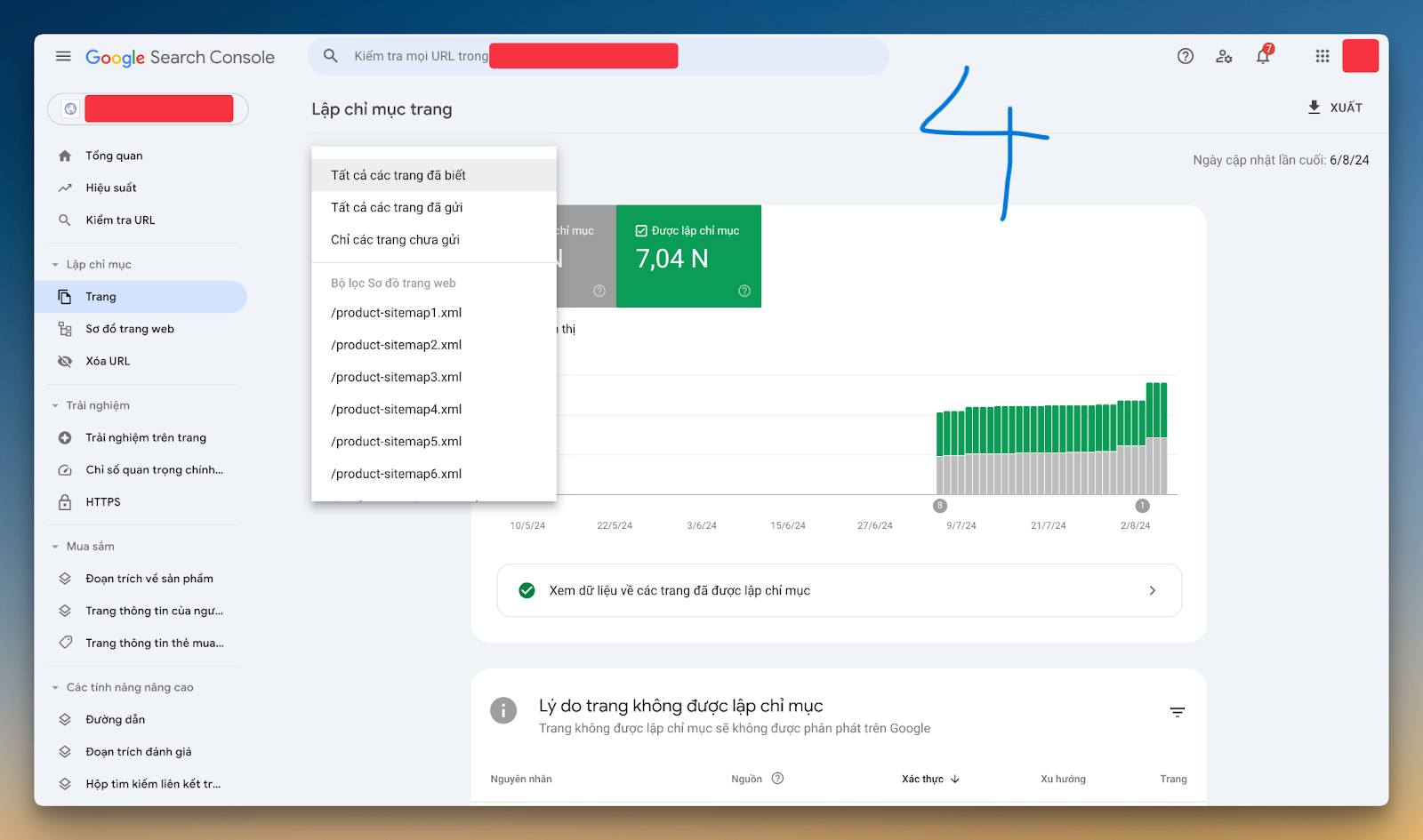
Export indexing data of each sitemap here
Can you do a screencast to see how do you export the URLs file? From there I can only see the exported file with the stats, but not the URLs

#29
@
7 months ago
@SirLouen @desrosj How to export indexed or unindexed urls from sitemap
Step 1:
https://drive.google.com/file/d/1RSjl_C7PLawlmsETaDIMsv-xy9S6F4f2/view
Step 2:
https://drive.google.com/file/d/1hKbgsByPKE0qX4T5oKok6b9BgQDua0EU/view
Step 3:
https://drive.google.com/file/d/1hEaD4BkjQ70Q-WeqdKLlMQabDjJHX858/view
Step 4:
https://drive.google.com/file/d/13i5mmPXG-6gHg4ZTABZ8UObHPDaxPXCR/view
#30
@
7 months ago
@phanduynam here you show 1K pages. But how can you get the 2K, 3K, 4K...?
It seems there is a hard-limit of 1K.
In my case I have 7.5K pages, but I can only see the first 1K. I'm not even using the WP sitemap but it's a page with another CMS I'm looking for this.
#31
follow-up:
↓ 32
@
7 months ago
@SirLouen As said, for example, the website has 10,000 pages, I divide 1000 pages into 1 sitemap. So I have 10 sitemaps. Repeat the above steps 10 times for each sitemap, you will have indexed or unindexed data of 10,000 pages.
#32
in reply to:
↑ 31
@
7 months ago
Replying to phanduynam:
@SirLouen As said, for example, the website has 10,000 pages, I divide 1000 pages into 1 sitemap. So I have 10 sitemaps. Repeat the above steps 10 times for each sitemap, you will have indexed or unindexed data of 10,000 pages.
Ok, I get your idea now. Let me do some tests, and I will get back to you.
#33
follow-up:
↓ 34
@
7 months ago
Following your steps, I am still unable to reproduce. But I also get a different result than you.
When I view a specific sitemap, I have issues with well over 1,000 affected pages. So that 1,000 may just be a coincidence for you and not a hard limitation.
When I click export, I still only get a list of dates with the total number of affected pages and no URLs.
#34
in reply to:
↑ 33
@
7 months ago
Replying to desrosj:
When I click export, I still only get a list of dates with the total number of affected pages and no URLs.
When you get the Google Docs export file, check the tab "Table"
#35
@
7 months ago
@desrosj look down at your google spreadsheet there are 3 tables and you are on table number 1
#36
@
7 months ago
Generally, 1000 URLs/1 sitemap is the industry standard. All webmaster tools and plugins default to this ratio. Only WordPress defaults differently.
#37
in reply to:
↑ 16
@
7 months ago
- Keywords 2nd-opinion added
After some testing and a little research, I have to confirm that the idea of bringing it down to 1000 URLs per sitemap makes a lot of sense, and I have observed that all major SEO plugins use 1000 or less URLs per sitemap (Yoast, 1000, SEOPress, 1000 and RankMath, 200, by default).
This said, as expected, the 2000 was selected completely at random, more specifically, it was originally being calculated as 20 * 100.
Only God knows why specifically 20 * 100. This kind of undocumented change gives too much of room for imagination.
For these reasons and the ones stated by @phanduynam related to GSC, which is a major player in sitemap-related topics, I'm in favor of reducing the default constant to 1000. The lesser this constant number, the easier it is to maneuver for sitemap users in this regard.
Replying to swissspidy:
Lowering the number of posts per page would have unintended consequences like doubling the load on the website when tools access the sitemap. If anything, I would actually increase the number, but that has negative consequences as well (e.g. temporary 404s for some paginated requests).
Given that there is a hard limit of 50000 I completely doubt that performance issues are relevant here. We are not talking about potentially millions of posts in place. The limit is capped at 25 sitemap pages now, or 50 if we add this patch. If anyone wants to play with millions of URLs or massive sitemaps, the filters are there, but the other way around, highly capped limit and low amount of urls per sitemap, seems to be the most common use-case both in tools and plugins.
So as I've said, I'm in favor of reopening and adding the needs-patch (pretty simple patch though).
Waiting for @desrosj verdict.
#38
@
7 months ago
This would make sense if the issue related to the 404 sitemap url error was resolved before https://core.trac.wordpress.org/ticket/51912
#40
@
7 months ago
- Resolution wontfix deleted
- Severity changed from normal to major
- Status changed from closed to reopened
#41
@
7 months ago
- Milestone set to Awaiting Review
- Severity changed from major to normal
@phanduynam I already told you via DM that I am on vacation. This is an open source project, we're all volunteers, please keep this in mind when you set unrealistic expectations. Maybe take a break yourself from time to time, I can highly recommend this to anyone.
Hi @phanduynam Welcome to trac!
https://developers.google.com/search/docs/crawling-indexing/sitemaps/build-sitemap