![(please configure the [header_logo] section in trac.ini)](/chrome/site/your_project_logo.png)
Opened 8 weeks ago
Closed 13 days ago
#65275 closed defect (bug) (fixed)
Media Library CSS Bug: Loading spinner misaligned in media modal filter toolbar
| Reported by: | luismulinari | Owned by: | joedolson |
|---|---|---|---|
| Priority: | normal | Milestone: | 7.0.1 |
| Component: | Media | Version: | |
| Severity: | normal | Keywords: | has-patch has-test-info commit dev-reviewed fixed-major |
| Cc: | Focuses: | ui, css |
Description
When opening the media library modal (e.g. via "Add Media" or any block that triggers it), the loading spinner that appears while attachments are being fetched is rendered below the filter dropdowns rather than inline/to the left of them, and is clipped by an overflow: hidden constraint.
Steps to reproduce:
1) Open any post/page editor and click "Add Media".
2) Switch to the "Media Library" tab.
3) Observe the spinner that appears while media is loading.
- Expected behavior:
The spinner should appear inline with or to the left of the "Filter by type" and "Filter by date" dropdowns in the .media-toolbar-secondary area.
- Actual behavior:
The spinner appears below the dropdowns and is partially or fully hidden due to overflow: hidden on the containing element.
- Root cause analysis:
This appears to be a regression introduced by the CSS layout changes in [62326] / [62327] (merged to 7.0 in commit d3675e3). That changeset switched .media-toolbar-secondary from display: flex with gap: 12px to display: grid with explicit grid-template-columns: repeat(2, 1fr) and grid-template-rows: repeat(2, 1fr). The spinner element (.media-spinner or equivalent) is not assigned to any named grid area, so it falls outside the defined grid tracks and gets pushed below — where overflow: hidden clips it.
Attachments (1)
Change History (17)

This ticket was mentioned in PR #11888 on WordPress/wordpress-develop by @yogeshbhutkar.
8 weeks ago
#1
- Keywords has-patch added
@dhruvang21 commented on PR #11888:
8 weeks ago
#2
@yogeshbhutkar Tested using the WP playground seems to work fine in desktop view but we need to fix it in responsive views
#4
 @
@
6 weeks ago
- Milestone 7.1 → 7.0.1
This is a regression in 7.0, so I'm going to switch the milestone to 7.0.1.
@joedolson commented on PR #11888:
6 weeks ago
#6
This should now handle the spinner position and visibility in all viewports.
#7
@
5 weeks ago
- Keywords needs-testing has-test-info added
Testing:
- verify the filter spinner position is visible in small, medium, and large viewports
- verify that all fields are visible on medium and large viewports
- verify that all fields are reachable via scrolling on small viewports
#8
 @
@
5 weeks ago
Test Report
Patch tested: https://github.com/WordPress/wordpress-develop/pull/11888
Environment
- WordPress: 7.1-alpha-62161-src
- Subdirectory: No
- PHP: 8.3.30
- Server: nginx/1.29.5
- Database: mysqli (Server: 8.4.8 / Client: mysqlnd 8.3.30)
- Browser: Chrome 149.0.0.0
- OS: Windows 10/11
- Theme: Twenty Twenty-Five 1.5
- MU Plugins: None activated
- Plugins:
- Test Reports 1.3.0
Steps taken
- From the admin dashboard, go to Post > Add Post.
- Add an image block and select the Media Library option.
- Open Dev tools, and locate the spinner element (.media-frame .spinner).
- Then change the visibility property to
visible. - Confirm the position of the spinner in small, medium and large viewports before and after the patch.
- Confirm all the fields are visible in the large viewport and visible by scrolling in small and medium viewports before and after the patch.
- ✅ Patch is solving the problem.
Expected result
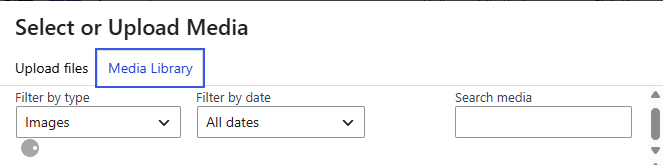
- The spinner is positioned to the left of the Filter by date dropdown in the large viewport.
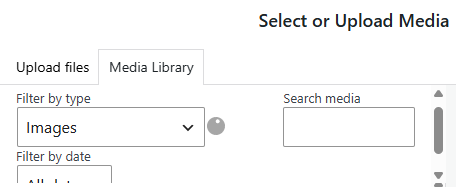
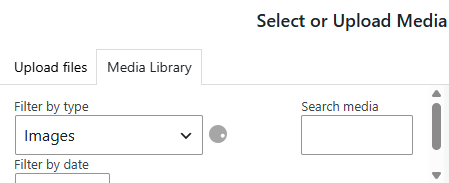
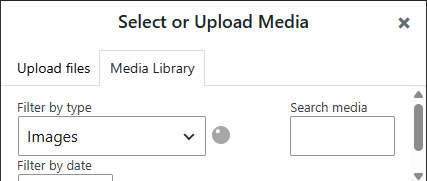
- The spinner is positioned to the left of the Filter by type dropdown in medium and small viewports.
- All the fields are visible and reachable in all viewports.
Additional Notes
- The position of the spinner in the large viewport is slightly misaligned; changing the top value should correct this.
.media-toolbar-secondary > .spinner {
	position: absolute;
	left: calc( 100% + 5px );
	top: 50%;
	margin: 0;
}
- However, changing this will misalign the spinner for screen sizes between 900px to 783px. But this can fixed by adding a top property under the
@media only screen and (max-width: 900px)breakpoint.
.media-frame .media-toolbar-secondary .spinner {
	top: 0;
}
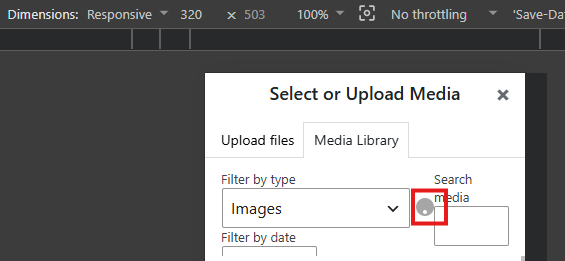
- The space on the right side of the spinner on screens "320px >" gets a bit tight as the spinner touches the Search media field slightly. I'm not sure if we are currently accommodating smaller screens. I thought this was worth mentioning. See screenshot below in the Support Content section.
Screenshots/Screencast with results
| Screenshot Before | Screenshot After |
|---|---|
| Spinner position large viewport(1024px) | |
 | 
|
| Spinner position medium viewport(768px) | |
 | 
|
| Spinner position small viewport(425px) | |
 | 
|
Support Content
- Field visibility in all viewports
https://files.catbox.moe/60n9u7.mp4
- Smaller screen (320px>) spinner touches
#9
@
5 weeks ago
Thanks for the thorough test, @r1k0!
It turned out that actually this really needed independent support for viewports between 782 and 900px, so I made a couple of additional changes beyond what you suggested.
There are definitely problems at 320px and below, but overall WordPress has almost no styling targeted at the 320px viewport size, and while I think this may be worthwhile to implement, I think it's a more significant change, and not something that should be blocking this change.


Trac ticket: https://core.trac.wordpress.org/ticket/65275
## What?
Fixes the Media Library loading spinner alignment in the secondary filter toolbar.
## Why?
With the toolbar using a grid layout for filter controls, the spinner could fall out of place depending on which filters were rendered. That also caused an unintended scrollbar in the filter area because the spinner no longer appeared adjacent to the filters.
## How?
Keeps the existing grid layout intact and positions the spinner relative to .media-toolbar-secondary, so it stays aligned at the end of the toolbar and loads adjacent to the filters.
## Use of AI Tools
AI assistance: Yes
Tool(s): Codex
Model(s): GPT-5.4
Used for: Initial code skeleton; final implementation was reviewed and edited by me.