![(please configure the [header_logo] section in trac.ini)](/chrome/site/your_project_logo.png)
Opened 2 days ago
Last modified 4 hours ago
#66279 new defect (bug)
Category Search Fails When Search Term Contains an Ampersand Followed by a Space, Admin Page/Post Editor
| Reported by: | chhapoliya | Owned by: | |
|---|---|---|---|
| Priority: | high | Milestone: | Awaiting Review |
| Component: | Taxonomy | Version: | 7.1.2 |
| Severity: | normal | Keywords: | has-patch has-unit-tests |
| Cc: | Focuses: | ui, accessibility, administration |
Description
Bug Report:
Product: WordPress
Version: 7.1.2, 7.1.3 and others
Component: Posts / Categories / Editor
Issue Type: Bug
Summary
When adding or editing a post in the WordPress admin dashboard, searching for a category whose name contains an ampersand (&) followed by a space does not return the expected search result.
For example, a category named “Tour & Travel” cannot be found when searching for Tour & (including the trailing space).
## Steps to Reproduce
- Create a category named
Tour & Travel. - Navigate to Posts → Add New or edit an existing post.
- Open the Categories panel in the post editor.
- Search for
Tour &, including the space after the ampersand. - Observe the search results.
## Expected Behavior
The category “Tour & Travel” should appear in the search results when searching for Tour & , since the entered text matches the beginning of the category name.
## Actual Behavior
The category does not appear in the search results when the search term contains an ampersand followed by a space.
## Additional Information
- The issue occurs in the WordPress admin post editor while adding or editing a post.
- The affected category contains an ampersand followed by a space in its name.
- The issue appears to involve partial category-name matching when special characters and whitespace are present.
Suggested investigation: Check how the category search filters and processes search terms containing ampersands and trailing whitespace, including any differences in query tokenization or sanitization.
## Impact
This behavior makes it harder for users to find and assign categories containing ampersands when searching by partial category name.
## Environment
- WordPress version: 7.1.2 and others
- Editor: [Gutenberg / Classic Editor — specify which applies]
- Browser: Tested in Chrome & Safari
- Active plugins: No, Tested in PlayGround
Attachments (1)
Change History (4)
#1
 @
@
39 hours ago
Reproduction Report
Environment
- WordPress: 7.2-alpha-63166-src
- Subdirectory: No
- PHP: 8.3.33
- Server: nginx/1.31.6
- Database: mysqli (Server: 9.7.2 / Client: mysqlnd 8.3.33)
- Browser: Chrome 154.0.0.0
- OS: macOS
- Theme: Twenty Twenty-Five 1.5
- MU Plugins: None
- Plugins: Test Reports 1.3.1
Steps taken
- Navigated to Posts → Categories and created a category named
Tour & Travel. - Created additional dummy categories (at least 8–10 total) so the block editor displays the category search input field.
- Navigated to Posts → Add New.
- Expanded the Categories panel in the editor settings sidebar.
- In the Search Categories input, typed
Tour &(including the ampersand and trailing space). - Bug occurs: The
Tour & Travelcategory disappears from the list, displaying "0 results found."
Expected behavior
The category Tour & Travel should remain visible in the filtered results, since Tour & matches the beginning of the category name.
Screenshots
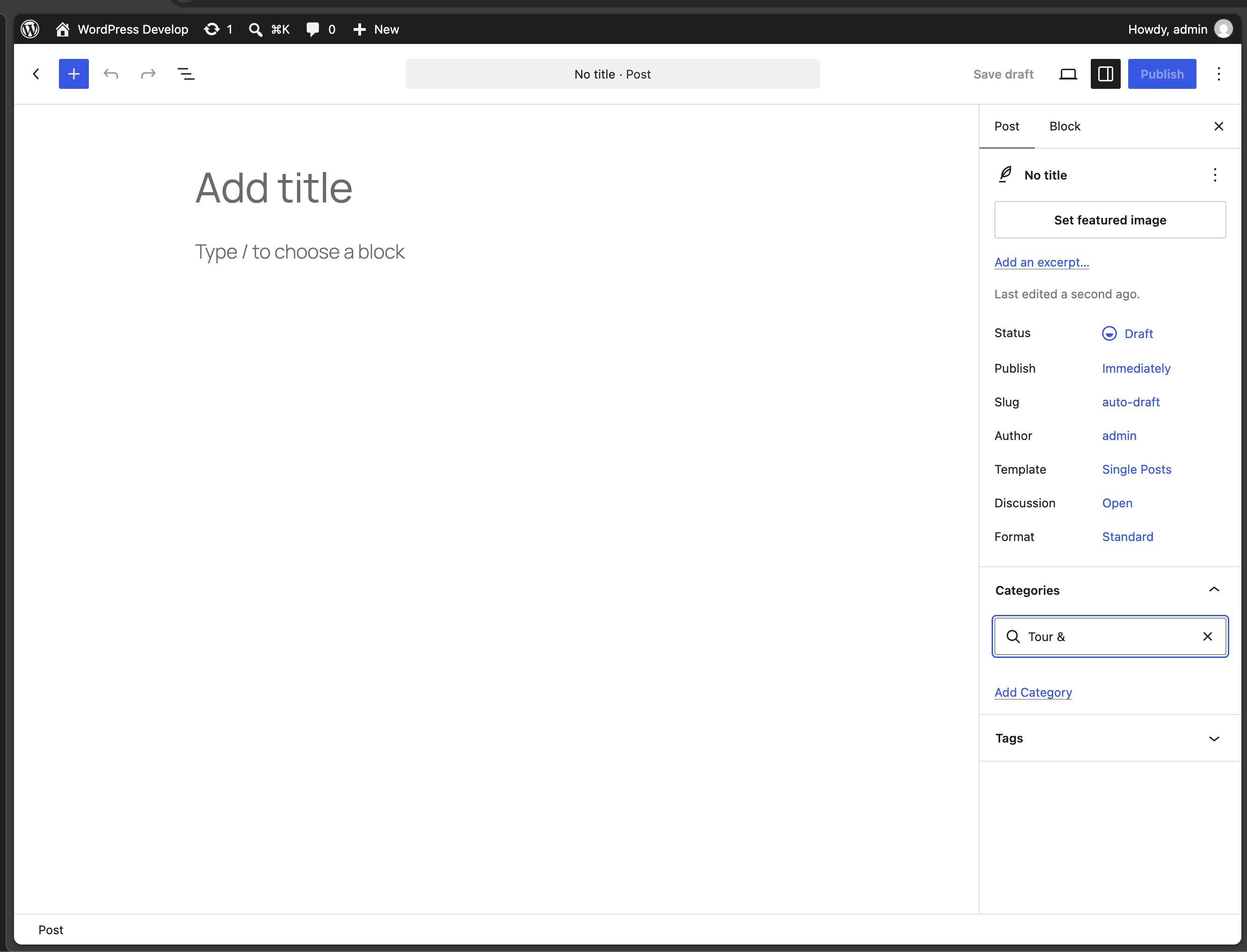

This ticket was mentioned in PR #14187 on WordPress/wordpress-develop by @therssoftware.
4 hours ago
#2
- Keywords has-patch has-unit-tests added
Taxonomy: Allow searching terms containing ampersands and HTML entities
---
Description
When term names are saved in WordPress, _wp_specialchars() encodes ampersands as & into wp_terms.name (priority 30 on pre_term_name in default-filters.php).
Prior to this change, WP_Term_Query::get_search_sql() created search clauses using only the raw $search value:
((t.name LIKE '%search%') OR (t.slug LIKE '%search%'))
Because MySQL does not equate raw '&' with '&', searching for terms containing ampersands (such as "Tour & ", "Tour & Travel", or "& Travel") failed completely on both wp-admin/edit-tags.php and any queries powered by WP_Term_Query / get_terms( array( 'search' => ... ) ).
Solution
In WP_Term_Query::get_search_sql():
- Check if the search term contains characters requiring HTML entity encoding (
_wp_specialchars( $search, ENT_COMPAT, 'UTF-8', true )). - Decode pre-encoded entities (
wp_specialchars_decode()) to support searches submitted with entities. - If distinct variants are found, expand the search query with an
ORcondition across both forms:(((t.name LIKE '%Tour & %') OR (t.slug LIKE '%Tour & %')) OR ((t.name LIKE '%Tour & %') OR (t.slug LIKE '%Tour & %')))
- If no special characters are detected, a single clause is generated, preserving identical execution and indexing performance for standard terms.
Testing Instructions
- Create a category named
Tour & Travel. - Search for
Tour &(with a trailing space) on Posts -> Categories (wp-admin/edit-tags.php?taxonomy=category). - Verify that
Tour & Travelis found in the search results table. - Run PHPUnit test suite:
vendor/bin/phpunit tests/phpunit/tests/term/getSearchSql.php
   vendor/bin/phpunit -c tests/phpunit/multisite.xml tests/phpunit/tests/term/getSearchSql.php
- Run PHPCS:
vendor/bin/phpcs src/wp-includes/class-wp-term-query.php tests/phpunit/tests/term/getSearchSql.php
#3
 @
@
4 hours ago
### Test & Review Report
Ticket: https://core.trac.wordpress.org/ticket/66279
PR: https://github.com/WordPress/wordpress-develop/pull/14187
Component: Taxonomy
Status: Has PR / Awaiting Review
---
#### Environment
- WordPress: 7.2-alpha-63166-src (trunk) & 7.1.3
- PHP: 8.4.1
- Server: macOS Darwin (arm64) / Nginx
- Database: MySQL 8.0.35
- PHPUnit: 9.6.37
- PHPCS: 3.13.5 (WordPress-Core)
- Browser: Google Chrome
---
#### Summary of the Issue & Proposed Changes
##### 1. The Issue
When term names are inserted/updated in WordPress, _wp_specialchars() is applied to pre_term_name at priority 30 in default-filters.php, encoding ampersands as & in wp_terms.name (e.g. "Tour & Travel" is stored as "Tour & Travel").
In WP_Term_Query::get_search_sql() (src/wp-includes/class-wp-term-query.php), search clauses were generated using only the raw $search string:
`sql
((t.name LIKE '%search%') OR (t.slug LIKE '%search%'))
`
Because MySQL does not equate '& ' with '& ', any search term containing an ampersand followed by a space or word (e.g. "Tour & ", "Tour & Travel", or "& Travel") fails to return results on:
- Admin Categories list table (
wp-admin/edit-tags.php?taxonomy=category) - Block Editor post categories filter
- REST API queries (
/wp/v2/categories?search=...) andget_terms( array( 'search' => ... ) )
##### 2. Proposed Changes
WP_Term_Query::get_search_sql()now detects special characters and generates search clauses for both raw and HTML-entity-encoded forms (_wp_specialchars( $search, ENT_COMPAT, 'UTF-8', true )).- Pre-encoded entities are decoded using
wp_specialchars_decode()to also support queries submitted with entities. - When multiple variants exist, clauses are combined with
OR:`sql (((t.name LIKE '%Tour & %') OR (t.slug LIKE '%Tour & %')) OR ((t.name LIKE '%Tour & %') OR (t.slug LIKE '%Tour & %')))` - When no entities/special characters are present, a single clause is generated without overhead, ensuring zero regressions for standard queries.
---
#### Verification & Test Results
##### 1. Bug Reproduction (without patch)
- In the Block Editor, creating category
"Tour & Travel"and typing"Tour & "in the Categories search box returned 0 categories found. - In
wp-admin/edit-tags.php?taxonomy=category, searching for"Tour & "intag-search-inputreturned No categories found. - In PHPUnit:
`php get_terms( array( 'taxonomy' => 'category', 'search' => 'Tour & ', 'fields' => 'ids' ) );` Returned emptyarray().
##### 2. After Applying Patch
- Searching
"Tour & "or"Tour & Travel"in the Block Editor instantly displays"Tour & Travel", allowing selection and saving. - Searching
"Tour & "onwp-admin/edit-tags.php?taxonomy=categorydisplays"Tour & Travel"in the table.
##### 3. Dedicated PHPUnit Tests
Added dedicated test file tests/phpunit/tests/term/getSearchSql.php:
- Tests all 8 variations of ampersand queries (
'Tour & ','Tour & T','Tour & Travel','& Travel','&','Tour & ','Tour & Travel','& Travel'). - Tests standard searches without entities (
'bur'matching'Burrito'and'Wilbur'). - Validates SQL structure via Reflection (single clause for standard terms, composite
ORfor entity variations).
Single Site:
`bash
vendor/bin/phpunit tests/phpunit/tests/term/getSearchSql.php
`
`text
.......... 10 / 10 (100%)
OK (10 tests, 31 assertions)
`
Multisite:
`bash
vendor/bin/phpunit -c tests/phpunit/multisite.xml tests/phpunit/tests/term/getSearchSql.php
`
`text
.......... 10 / 10 (100%)
OK (10 tests, 31 assertions)
`
Regression Suite:
`bash
vendor/bin/phpunit tests/phpunit/tests/term/getTerms.php tests/phpunit/tests/term/query.php
`
`text
OK (114 tests, 378 assertions)
`
##### 4. PHPCS Standards Verification
`bash
vendor/bin/phpcs src/wp-includes/class-wp-term-query.php tests/phpunit/tests/term/getSearchSql.php
`
`text
.. 2 / 2 (100%)
Time: 160ms; Memory: 8MB
`
0 errors, 0 warnings.
- Followed global variable placement (
global $wpdb;placed immediately before first use).


The search with space after ampersand shows no result, in categories